
Windows may show a warning: that is expected
On first run Windows may show “Windows protected your PC”. It has nothing to do with the contents of the file: it happens to applications that have not yet built a reputation with Microsoft, which grows with downloads. Here is how to continue.
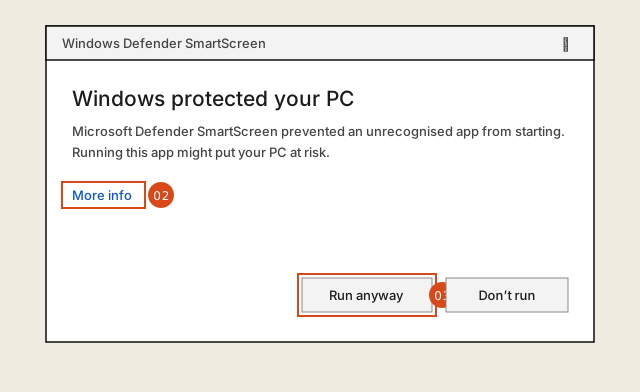
- 01 Open AMetric_toolbox_setup.exe from your downloads folder.
- 02 In the blue window, click More info: the publisher, Andrea Mercurio, appears together with a button at the bottom.
- 03 Click Run anyway. The installation proceeds normally.
- 04 On first launch, enter your e-mail and start the free trial: it is needed to open the tools, the free ones included. No payment details.
The installer is signed with a code signing certificate issued by Certum to Andrea Mercurio after an identity check: that is the name Windows shows as the publisher. The warning may still appear until the certificate, which is new, has built a reputation with Microsoft. The file comes from the official GitHub releases repository and passes through no other server. It installs for the current user only, under %LOCALAPPDATA%: no administrator rights are required and nothing else on the computer is touched.
Installer SHA-256 checksum — matches the one published among the release assets: 0aff1d2fa8ca4388bddd50448cf083294f0f22ce2364c09b4417267d345fd010 Release .sha256 file ↓
Download did not start? Download it again ↓